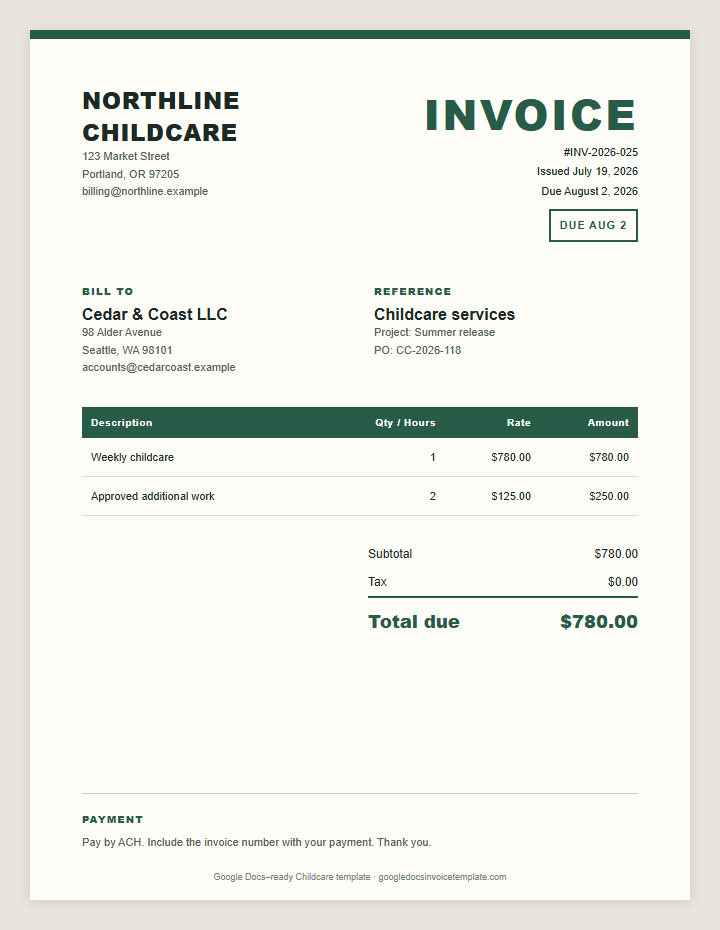
Childcare Invoice Template for Google Docs
Use this childcare invoice when you need a clear record of dates, hours, and reimbursement items. Copy it. Replace the details. Check the math. Export a PDF.
Free. No signup. Opens the Google Docs copy confirmation page.
What to Include in a Childcare Invoice
Add your business name, email, mailing address, and the client’s billing contact. Give the invoice a unique sequential number. Show the issue date and one exact due date.
Describe the work in the language used in the estimate, proposal, or agreement. A client should be able to match each invoice line to an approved service or deliverable. Use a separate row when the rate, quantity, service date, or approval source is different.
- Name the childcare service, project, or billing period.
- List each approved charge on a separate line.
- Show the quantity or hours, rate, and line amount.
- Add the due date and payment instructions beside the total.
Finish with the subtotal, applicable tax, prior payments, and balance due. Put payment instructions under the total. Never place sensitive bank or card credentials in an invoice.
How to Use This Template
- Make the copy. Click the button above. Confirm the copy in Google Docs.
- Save a master. Add your business details and logo. Keep this file untouched so every invoice starts clean.
- Create the client invoice. Duplicate the master, add the client and work, calculate every amount, and assign the next invoice number.
- Send a PDF. Choose File → Download → PDF Document. Open it once, check the page break, then email it.
Tips for Childcare Invoicing
1. Match each line item to the language used in the estimate or client approval. Add enough detail for approval, but keep internal notes and time-tracking commentary out of the client document.
2. Send the invoice as soon as the work or billing milestone is complete. Add enough detail for approval, but keep internal notes and time-tracking commentary out of the client document.
3. Keep the editable Google Doc and the sent PDF in the same client folder. Add enough detail for approval, but keep internal notes and time-tracking commentary out of the client document.
Use the same file-name pattern every time: Client-InvoiceNumber-Date.pdf. Keep the editable Doc and sent PDF together.
Alternative formats
Use Docs for a clean page, or create the same layout with the Google Docs invoice generator when manual arithmetic becomes a risk. If a payment runs past its due date, use the late fee calculator to work out the charge under your agreed terms.
Related Google Docs invoice templates
Pick a billing structure that matches the job, not just the industry.
Childcare invoice FAQ
How do I use this childcare invoice template in Google Docs?
Click Make a Copy. Confirm the copy in Google Docs, replace the sample fields, check every amount, and export the finished invoice as a PDF.
What should I put on a childcare invoice?
Add your business and client details, invoice number, issue and due dates, an itemized description of the childcare work, quantity or hours, rate, total due, and payment instructions.
Does Google Docs calculate the total?
No. Google Docs tables do not calculate formulas. Check hours × rate and every total manually, or use the online invoice generator for automatic arithmetic.
Can I change the colors and logo?
Yes. Replace the business name with your logo, adjust the table colors, and remove fields you do not use. Keep the itemized work, total due, and due date easy to scan.